 Clock Wizz
CLOCKING SYSTEM BUYER’S GUIDE · SOUTH AFRICA
How to choose a biometric clocking system in South Africa.
A clocking reader records attendance events. The software and your review process turn those events into useful records. Compare the complete workflow, the equipment and the total cost before choosing a package.
Start with your attendance workflow
Write down how employees currently clock in, who checks the records and how your business prepares payroll. A useful demonstration should follow those steps, rather than showing only a successful fingerprint scan. If you manage a small business, bring an example of a normal week and an example with a missing clocking or a shift change.
1. Check the reader and the site
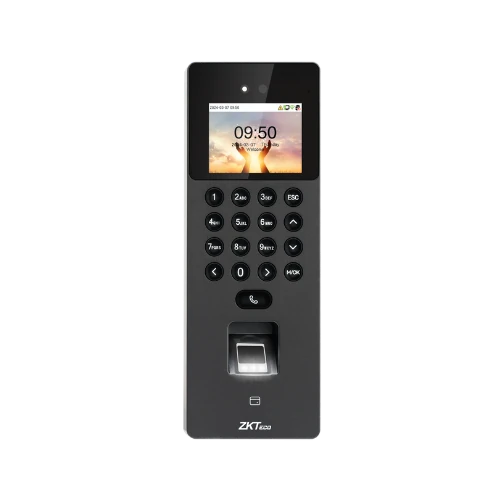
Clock Wizz’s published package includes one reader with facial and fingerprint recognition. Tell us how many employees, entrances and sites you need to manage. Ask us to confirm reader suitability, positioning, power and connection requirements for your actual premises before ordering. Do not assume that a single-reader package covers multiple sites.
2. Look beyond clock-in and clock-out
Ask to see employee clock cards, missing clockings and the Late / Early Report. Check how your administrator will review incomplete records and make authorised corrections. Agree who will review the exceptions before reports are used for payroll preparation.
3. Confirm the reports you need
Bring the layout or fields your payroll process requires. Clock Wizz provides attendance review and report exports, including CSV. An export is not the same as a confirmed direct integration with your payroll product. Check the format, date ranges and workflow during your demonstration.
4. Compare the full cost
Separate software licence fees, hardware, courier delivery and installation. Clock Wizz’s software licence is permanent, with no yearly renewal fees. The published package includes software and one biometric reader. Ask for a written quote if your requirements differ from the standard package.
5. Choose delivery and installation
The self-installation option includes free WhatsApp support and courier delivery across South Africa. Optional onsite installation is available in Gauteng with technician delivery. Confirm your computer setup and installation arrangements with Clock Wizz before choosing an option.
6. Plan who will manage attendance
Choose an administrator to maintain employee details and shifts, review missing clockings and keep report exports organised. Decide who can make corrections and how those changes will be checked. Ask for a walkthrough using examples relevant to your team.
Compare facial and fingerprint clocking in practice.
| Method | How staff identify themselves | What to check at your premises |
|---|---|---|
| Facial recognition | An enrolled employee presents their face to the reader’s camera. | Reader position, lighting, employee enrolment and a practical recognition test at the intended mounting point. |
| Fingerprint verification | An enrolled employee places a finger on the reader’s sensor. | Reliable enrolment and recognition for the staff who will use it, and a process for unsuccessful clockings. |
The Clock Wizz package offers both methods in one reader. Compare the actual reader and attendance workflow with your staff requirements rather than relying on a single successful scan.
USE THE SAME BRIEF FOR EVERY QUOTE
A site checklist for comparing clocking system quotations.
A reader price alone does not tell you whether a system fits your workplace. Write down the following details and ask each supplier to confirm the proposed setup in writing. Use fictional attendance examples and a blank payroll template for demonstrations.
| Your requirement | What to write down | What the supplier should confirm |
|---|---|---|
| Employees and shifts | Employee count, busiest clocking time, normal shifts and any overnight shifts. | Reader capacity, a practical clocking test and how your shift arrangements appear in the reports. |
| Entrances and sites | Every clocking point and whether employees move between locations. | Number of readers, connection plan and how records from the proposed setup will be reviewed. The standard Clock Wizz package includes one reader. |
| Computer and network | Windows version, PC location, network availability and distance to each reader. | Software requirements, reader communication and any cabling or network work included in the quote. |
| Power interruptions | Which reader, computer and network equipment needs backup power. | The equipment covered by any proposed UPS or battery and the steps to check clockings after an interruption. |
| Payroll preparation | A blank import template showing required columns, dates and employee identifiers. | A sample CSV export and any conversion or manual steps. Confirm a direct payroll integration separately if you need one. |
| Installation and support | Your location, self-installation preference and who will administer attendance. | Delivery, installation scope, training arrangements, support and any additional charges. |
Compare the complete cost for your chosen setup
Record the software licence, all required readers, delivery, installation, network work, backup power and any recurring charges on the same quotation. Ask whether VAT is charged. Clock Wizz’s published standard totals are R15,150 delivered for self-installation or R17,000 with Gauteng onsite installation, with no VAT charged. Additional requirements need a quotation.
For example, a business with two entrances should confirm whether it needs two readers and how both connect before comparing its quote with a one-reader package. A business preparing payroll from CSV files should test the export format before choosing on price.
Check the Clock Wizz package specifications and review the installation plan, then use the demonstration checklist below.
TRY YOUR EVERYDAY ATTENDANCE TASKS
A practical biometric clocking system demonstration.
Use a fictional employee to walk through an ordinary working day and an attendance exception. Use this checklist to compare the reader, attendance review and report export workflow before choosing your system.
- Start with a normal shift. Ask to see how an employee is enrolled, how a clock-in and clock-out are recorded, and where those events appear in the employee clock card.
- Test a missing clock-out. Ask how the Missing Clockings report highlights the incomplete record. Check how an authorised administrator investigates it, records a reason for a correction and reviews the result.
- Check attendance against a shift. Review the Late / Early Report and ask how your own shift arrangements would be configured. Confirm any overnight or unusual shift requirements before ordering.
- Follow the export through. Export a demonstration attendance report and compare its CSV fields with your payroll import template. Confirm any conversion or manual steps your administrator will need.
Bring your employee count, site and entrance count, Windows version, location and a blank payroll import template. Please do not send employee biometric data or passwords.
Watch the Clock Wizz software demonstration, then request a demonstration for your business.
Clock Wizz package costs at a glance
| Option | Included | Total |
|---|---|---|
| Self-installation with courier | Permanent software licence, one facial/fingerprint reader, R150 courier delivery and free WhatsApp support | R15,150 |
| Gauteng onsite installation | Permanent software licence, one reader, technician delivery and onsite installation | R17,000 |
No VAT is charged. The software and reader package is R15,000 before courier or optional installation. See the current pricing details and confirm your requirements when requesting a quote.
BEFORE YOU ORDER
Questions about biometric clocking systems.
Facial or fingerprint clocking: which should my team use?
The reader offers both methods. Facial recognition lets an enrolled employee identify themselves using the camera; fingerprint clocking uses the fingerprint sensor. During setup, check the reader’s position, lighting and recognition for your staff. Choose the method that works for each employee and agree how exceptions will be handled.
How do staff clockings reach the attendance software?
The software receives reader clockings over an IP network using ADMS communication. Setup includes matching the reader’s server settings to the Windows computer and checking that the network and firewall allow the connection. Confirm the supplied reader’s connection options and your site layout before installation.
What happens during load shedding or a network interruption?
The SenseFace 2A requires a 12V DC, 1.5A power supply. Its local transaction capacity is 150,000 records, but stored records and backup power are different requirements. Plan suitable power for the reader and Windows computer. During an interruption, do not assume that clockings have reached the software. Once power and the network return, check the device connection, import records and review missing clockings before preparing attendance reports. Confirm any UPS or battery option in your quotation.
Which Windows versions do I need?
Clock Wizz is a Windows desktop application. Use a Windows 10 or Windows 11 PC with an Intel or AMD processor and .NET Framework 4.7.2 or later. Administrator access is needed for installation. Confirm your Windows version and reader connection when arranging setup.
Will the reports work with my payroll process?
Clock Wizz provides attendance review and report exports, including CSV. Bring the report fields and format your payroll process needs to a demonstration. Confirm the workflow before ordering; an exported file does not by itself confirm a direct integration with a particular payroll product.
What is the full delivered or installed price?
The software and one reader cost R15,000. With R150 courier delivery and free WhatsApp support for self-installation, the total is R15,150. With Gauteng onsite installation, the total is R17,000 and the technician brings the reader at no courier charge. No VAT is charged. Confirm any additional site work in your quotation.
Questions to bring to your demonstration
Will the system fit my employee numbers and shift patterns?
Tell Clock Wizz your employee count, shift arrangements, entrances and sites. Request confirmation of the proposed reader and software setup for those requirements.
Can I review missing clockings before payroll?
Clock Wizz includes attendance review, a Missing Clockings report and employee clock cards. Ask to see how your administrator would investigate and correct an incomplete record.
Does a permanent licence mean there are no other costs?
There are no yearly software licence renewal fees. Courier delivery and optional onsite installation are separate package choices. Any additional requirements should be confirmed in a written quotation.
What should I send when requesting a quote?
Include your employee and site counts, location, shift patterns, computer setup, preferred installation option and required report format. Use the contact form or WhatsApp to discuss the setup.
CHOOSE WITH A CLEAR PICTURE
See the workflow before you decide.
Request a demonstration and discuss the equipment, reports and installation your business needs.