Less admin. More time for your business. Bring employee clockings, attendance and reports together with Clock Wizz software and a biometric reader with facial and fingerprint recognition. Courier delivery across South Africa, with optional onsite installation in Gauteng. Easily export attendance reports as CSV files for use with compatible payroll software.
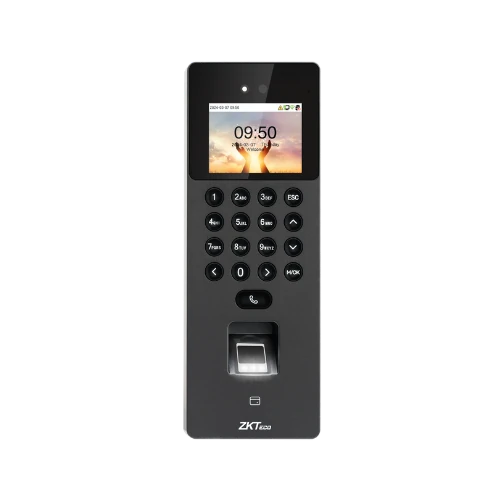
Give your team a choice at clock-in. The biometric reader combines facial recognition and fingerprint verification in one device, paired with Clock Wizz.
Facial recognitionFingerprint recognition
Dual biometric clocking in one terminal
Colour display and physical keypad
Employee clocking records for your attendance workflow
A biometric clocking system identifies an enrolled employee by their face or fingerprint and records a clocking event. Clock Wizz combines that reader with Windows attendance software, so your administrator can review the records before preparing attendance reports.
1. Enrol and clock
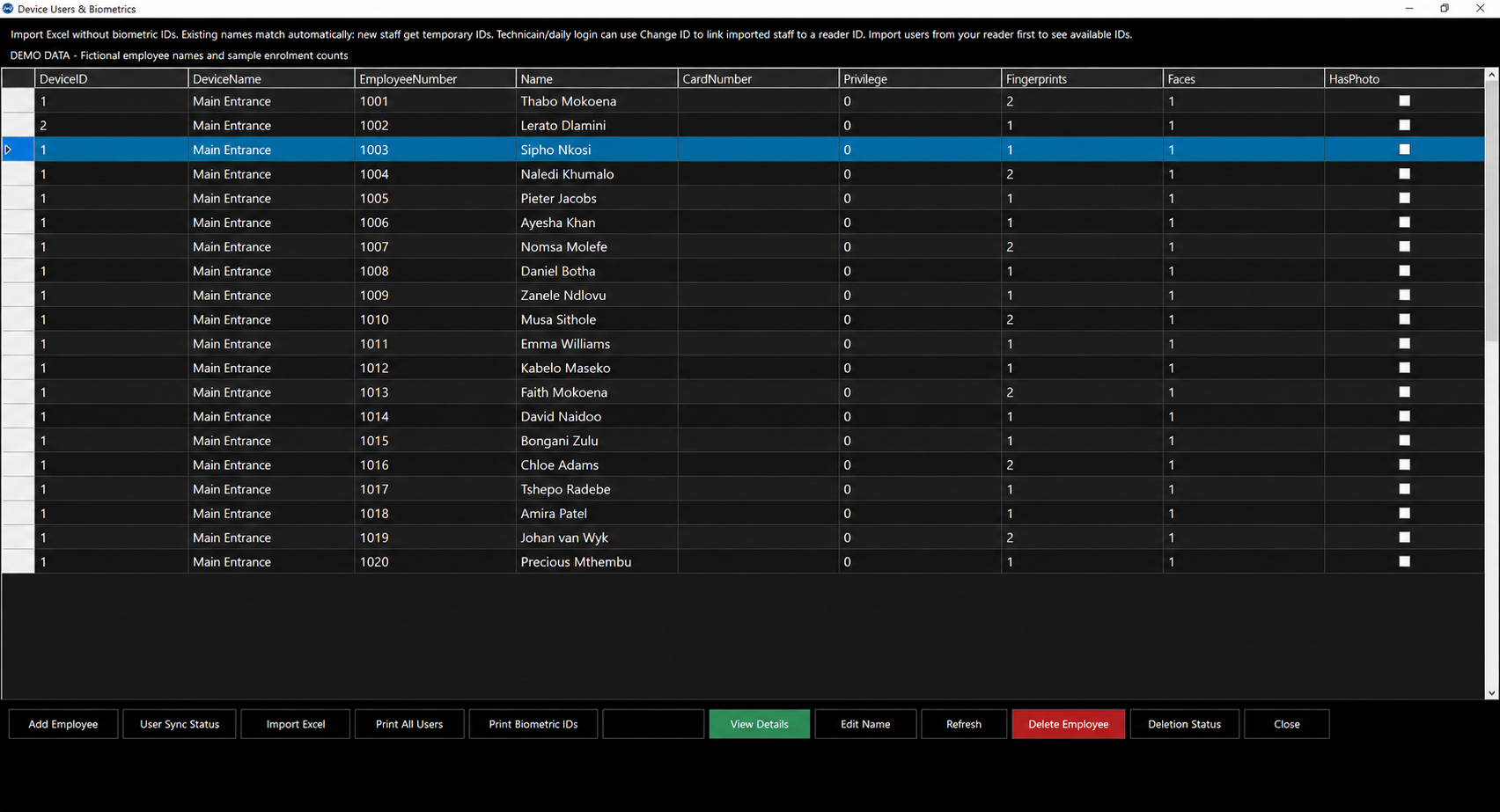
Set up employees on the reader, then test facial or fingerprint recognition where it will be used. Facial clocking uses the camera; fingerprint clocking uses the sensor. Check positioning and lighting, and agree a process for unsuccessful clockings.
2. Review attendance
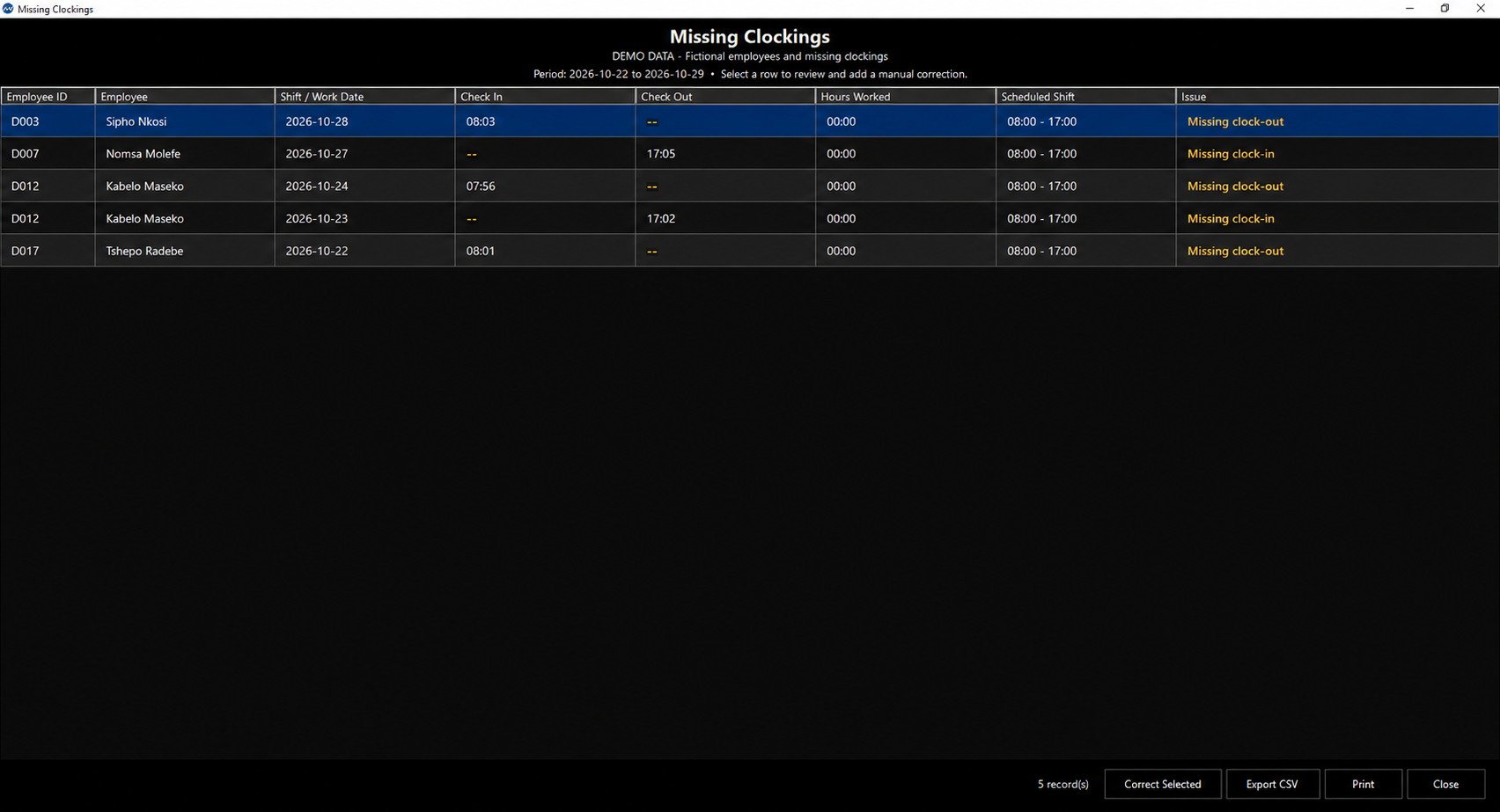
Bring clockings into Clock Wizz over your IP network. Review employee clock cards, late or early attendance and missing clockings. An incomplete record needs investigation before an authorised correction is made.
3. Prepare reports
Check the attendance records and export CSV reports for use with compatible payroll software. Confirm the required import fields first. Payroll exports do not automatically provide a direct integration with every payroll product.
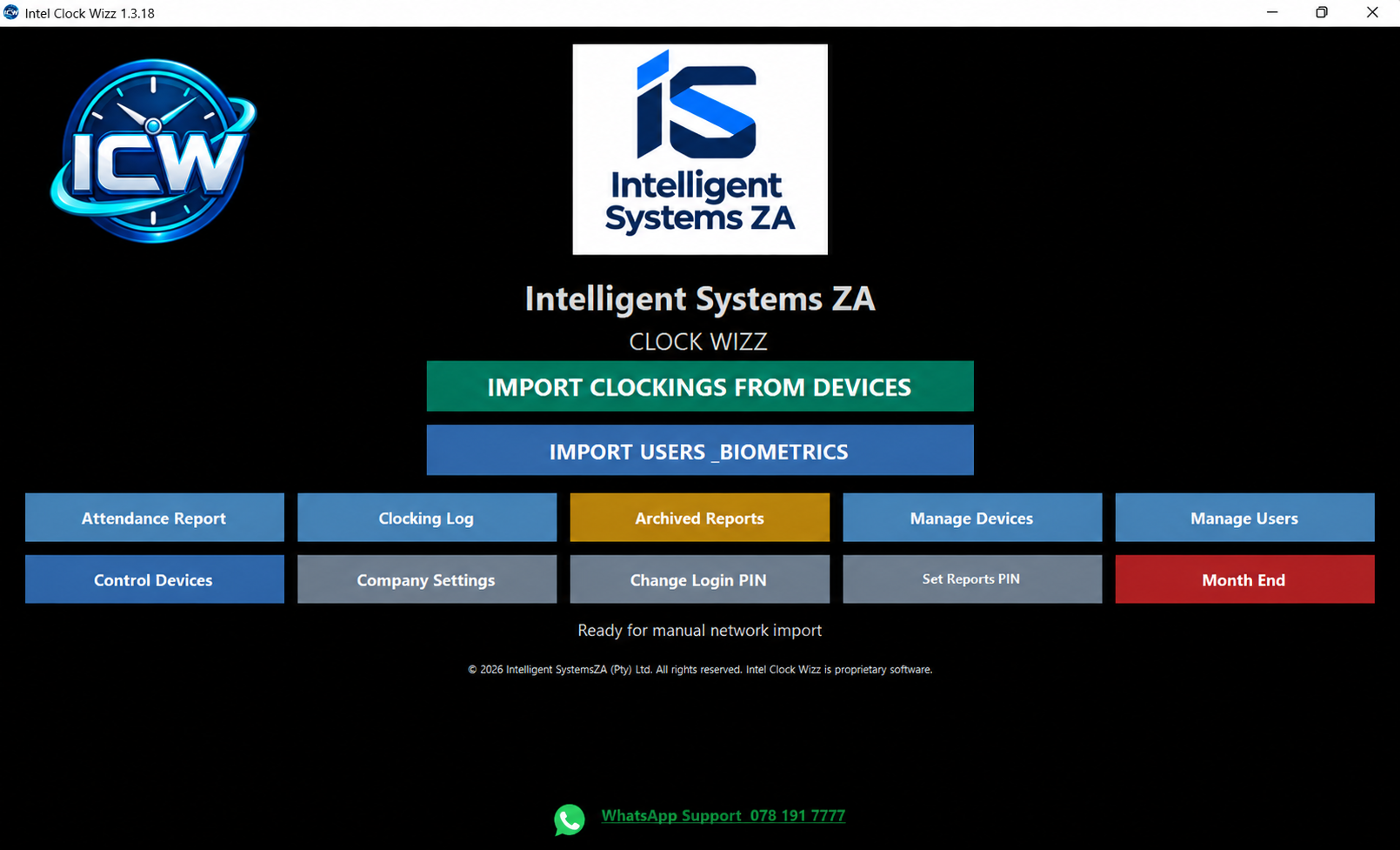
Follow the everyday workflow: import employee clockings, review attendance reports and clock cards, investigate missing clockings, make authorised corrections and export your reports.
5 minutes 47 seconds. Demonstration screenshots with fictional employee records and synthetic South African English narration.
Need a biometric clocking system in Meyerton or elsewhere in Gauteng? Arrange a demonstration or ask about onsite installation. Courier delivery is available across South Africa.
BUILT AROUND YOUR WORKDAY
Biometric clocking and employee attendance reports.
Give your team a way to clock. Give your administrator the tools to review what happens next.
◷
Capture the clockings
Use the biometric reader with Clock Wizz to bring employee clocking records into your attendance workflow.
☷
Make sense of attendance
Review attendance, investigate missing clockings and make authorised corrections before preparing reports.
↗
Keep the records moving
Work with employee details, shifts and clock cards, then review and export reports for your business.
INSIDE CLOCK WIZZ
Your attendance workflow, on screen.
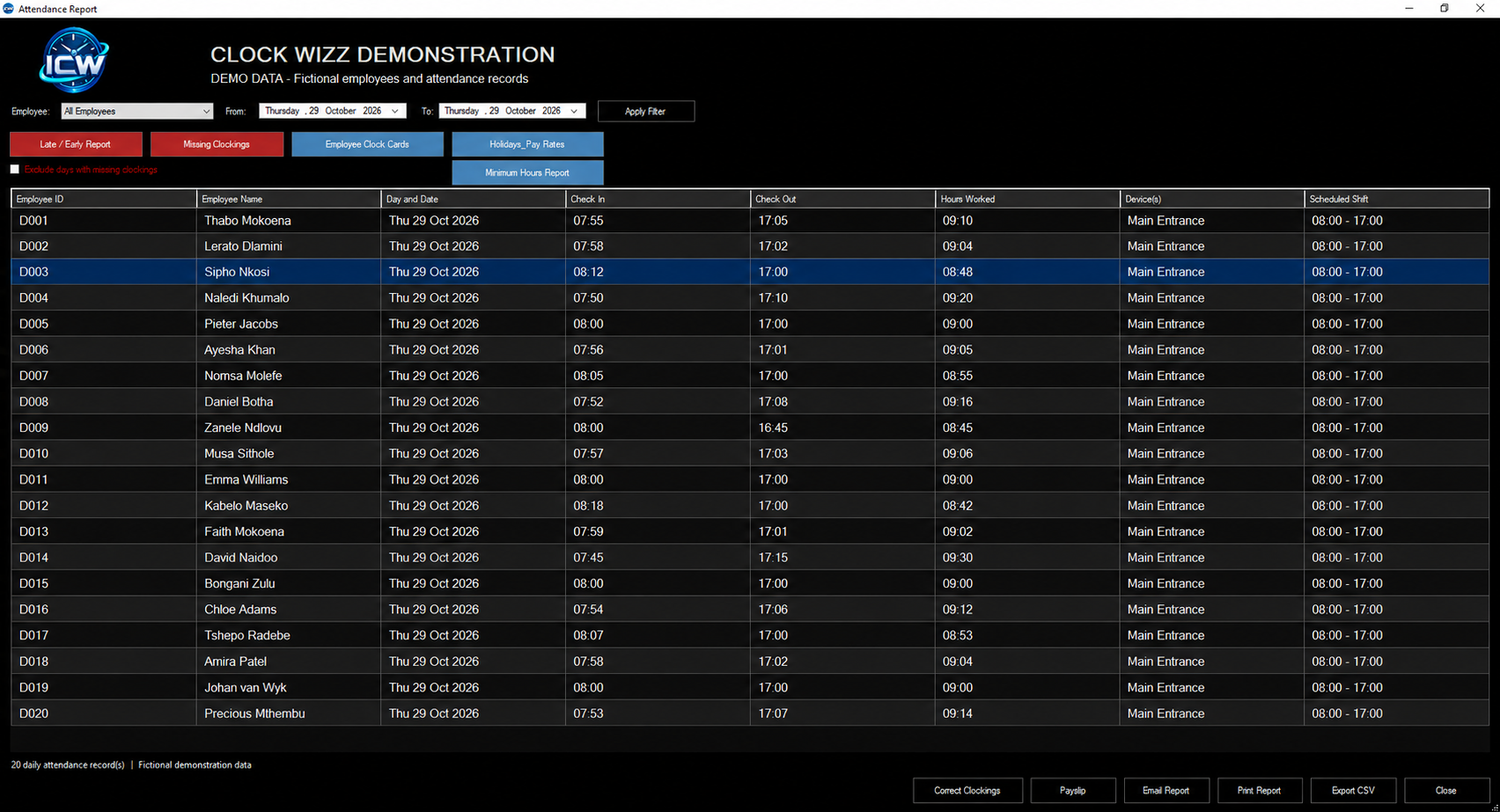
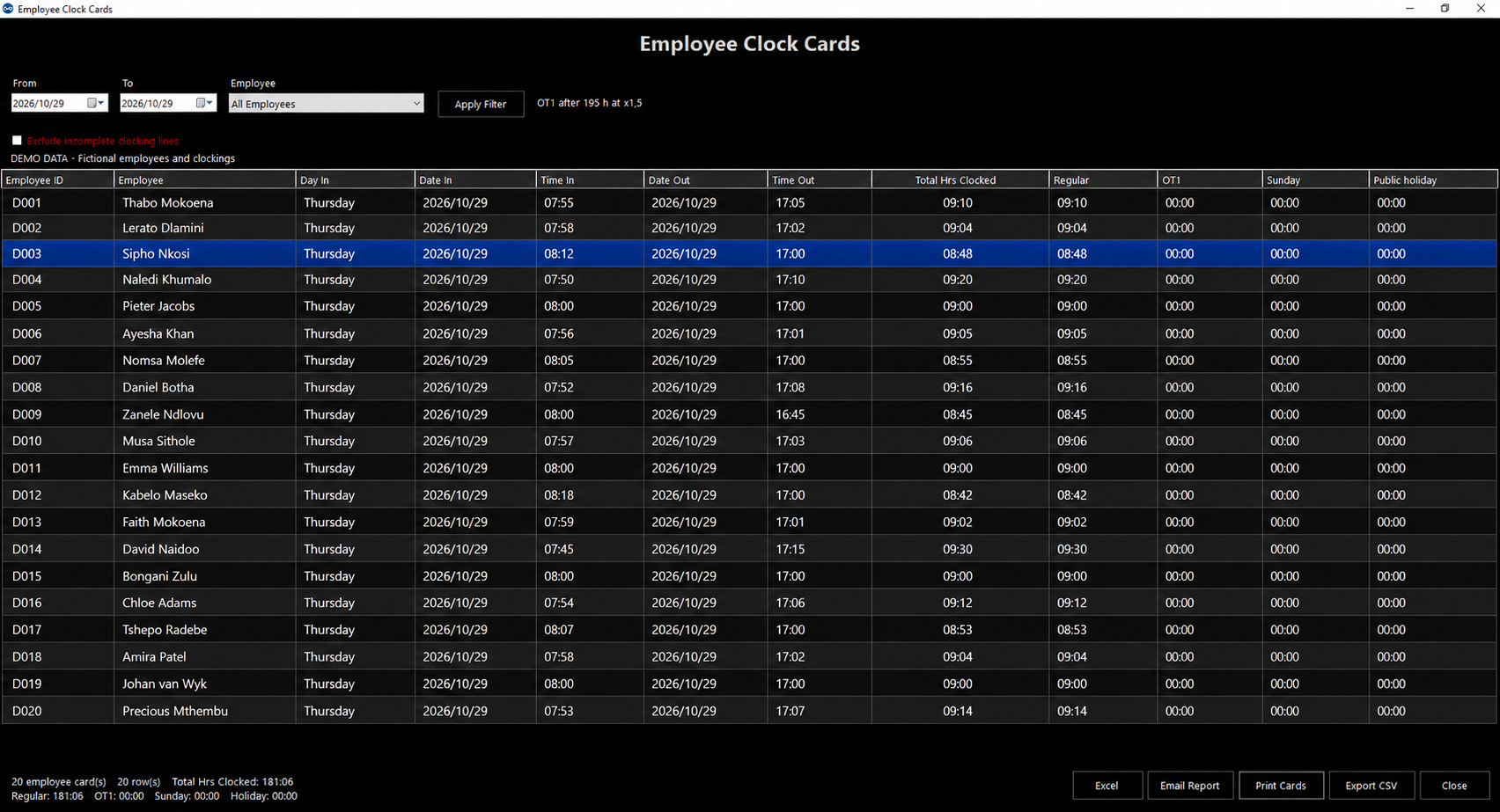
Select a preview to view the screenshot full screen. All employee records shown are fictional demonstration data.
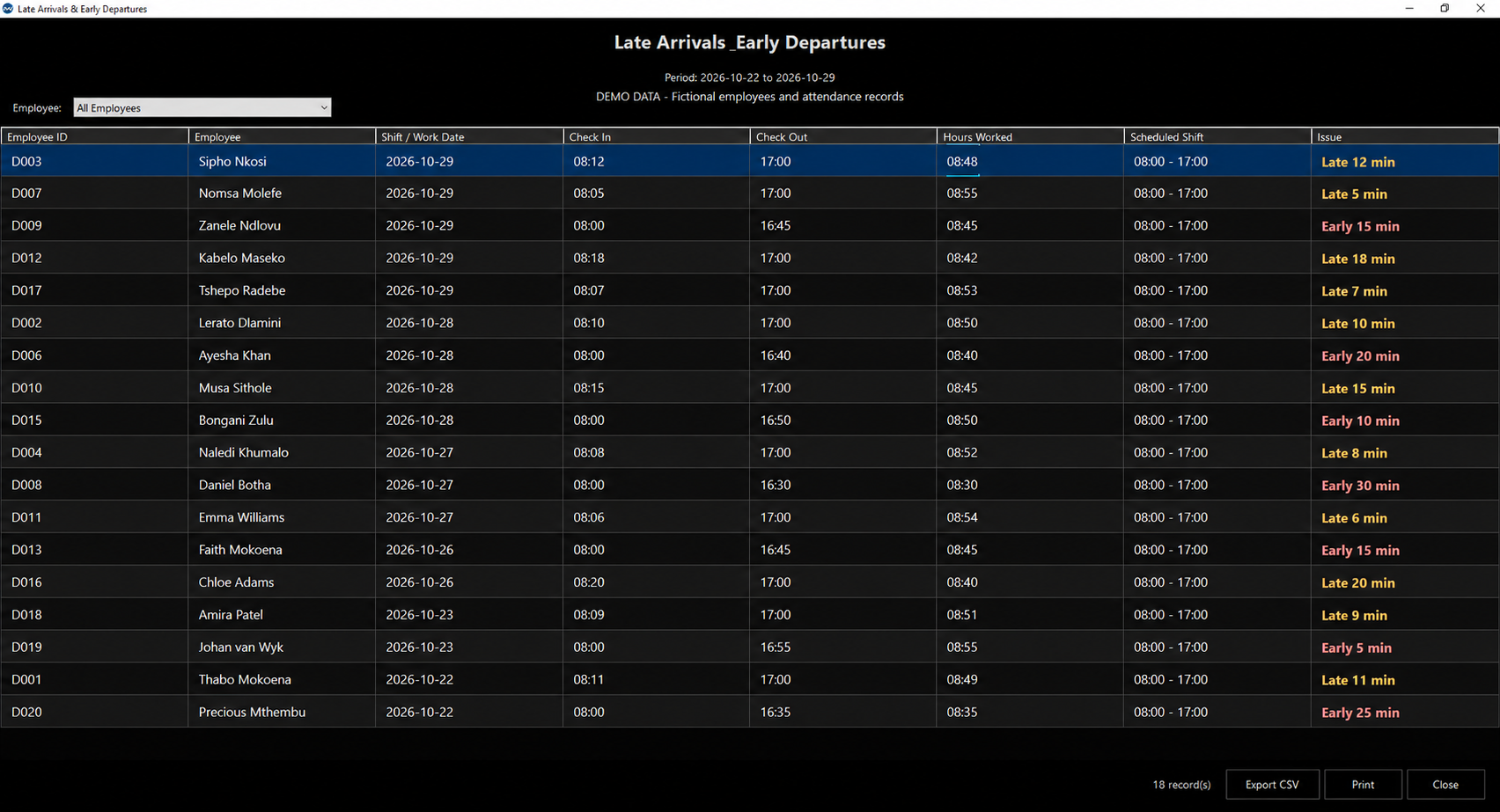
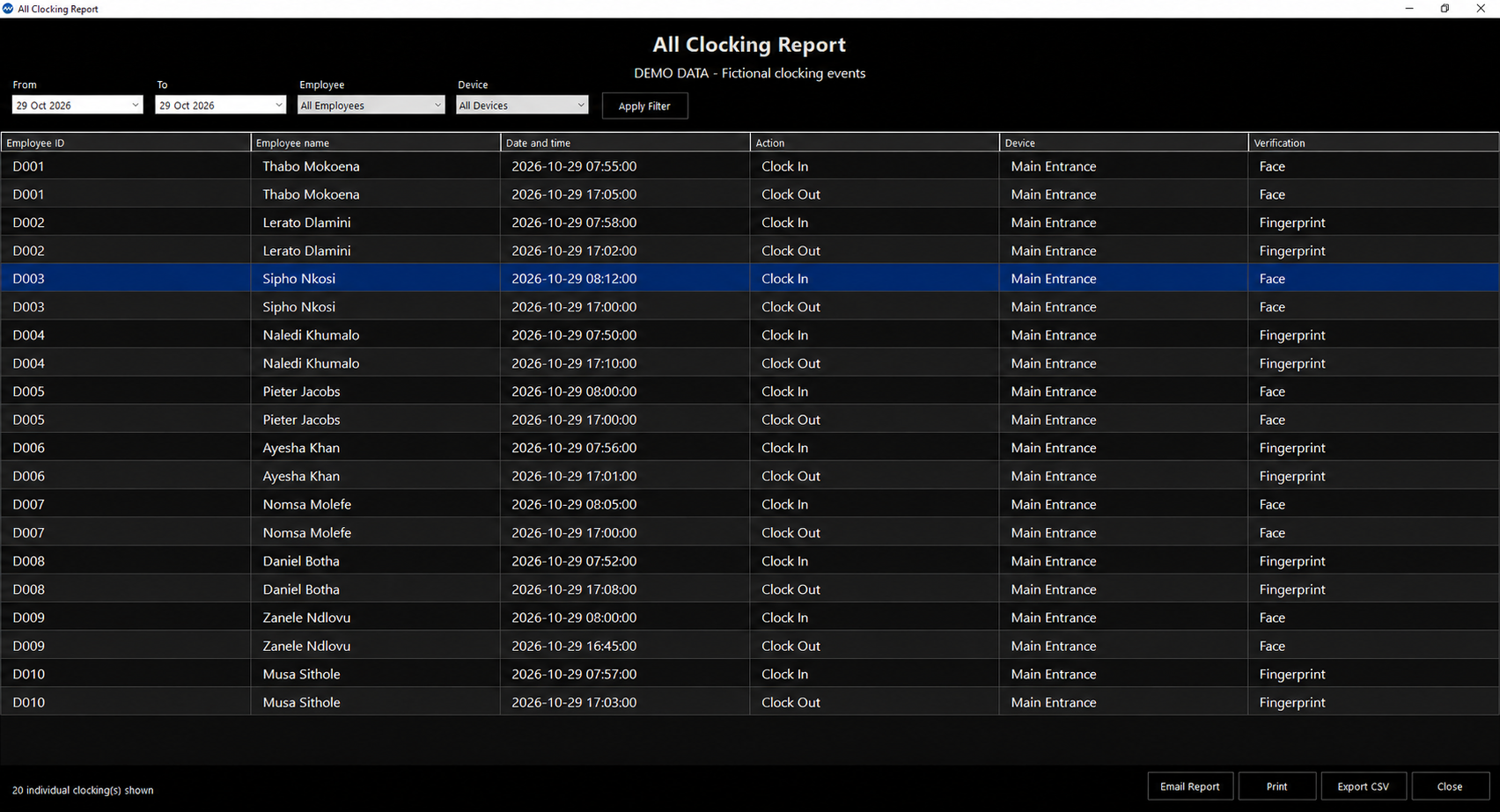
Attendance Report. Fictional demo data · Click to enlarge ↗Employee Clock Cards. Fictional demo data · Click to enlarge ↗Late Arrivals & Early Departures. Fictional demo data · Click to enlarge ↗Missing Clockings. Fictional demo data · Click to enlarge ↗All Clocking Report. Fictional demo data · Click to enlarge ↗Device Users & Biometrics. Fictional demo data · Click to enlarge ↗
FROM CLOCKINGS TO CLEARER REPORTS
See the hours. Resolve the exceptions.
Review hours worked, follow up on missing clockings and check early or late attendance before preparing your reports.
Clock Wizz helps employers maintain attendance records to support BCEA compliance.
01
Maximum hours worked
Use the maximum-hours-worked feature when reviewing employee hours. Check unusually long working periods before finalising attendance.
02
Missing clockings & adjustments
Find incomplete clocking records and make authorised corrections. Add or adjust a clocking with a recorded reason, then review the updated attendance.
03
Early & late attendance
Open the Late / Early Report to review attendance against scheduled shifts and follow up on exceptions with your team.
04
Employee clock cards
Review an employee's clocking history in a dedicated clock card. Keep the records you need for attendance queries and routine administration.
05
Attendance & worked hours
Filter attendance by employee and date range. Inspect check-in, check-out and hours worked, with a separate clocking log for individual events.
06
Easy exports for your payroll software
Easily export attendance reports as CSV files for use with compatible payroll software. Check your payroll system's required import format before importing. You can also print attendance reports or email them to your payroll administrator.
Choose your software and biometric reader package, then select installation support for your location.
01
Choose your package
Choose the R15,000 self-install software and biometric reader package, including free support over our WhatsApp helpline. Add Gauteng onsite installation if you need it.
02
Receive your reader
Without onsite installation, courier delivery within South Africa costs R150. With onsite installation, the technician brings your hardware at no courier charge.
03
Get ready to clock
Install your system, or arrange a technician visit. For installation outside Gauteng, request a quotation.
CHOOSING A BIOMETRIC CLOCKING SYSTEM
From staff clock-ins to attendance reports.
Compare the complete package: the ZKTeco SenseFace 2A facial and fingerprint reader, Windows software, connection setup and delivery or installation.
Check your computer and connection
Clock Wizz runs on Windows 10 or Windows 11 with .NET Framework 4.7.2 or later. Reader clockings reach the software over an IP network using ADMS communication. Confirm your PC and network setup before installation.
Know the total cost
R15,150 delivered for self-installation, including the R150 courier charge and free WhatsApp support. R17,000 with Gauteng onsite installation and technician delivery. No VAT charged and no yearly software renewal fees.
Plan for your business
Tell us your employee count, shifts, entrances and sites. Review clock cards, missing clockings and report exports in a demonstration, and confirm how your business will handle power or network interruptions.
Review employee clockings, attendance exceptions and clock cards with Clock Wizz. Permanent software licence and biometric reader, with South African delivery.
Clock Wizz software and facial/fingerprint reader for R15,000. R15,150 delivered for self-installation or R17,000 with Gauteng onsite installation. No VAT charged.
Software and hardware together, with optional installation.
No hidden costs. A once-off software licence fee, with no yearly renewal fees. Delivery and optional onsite installation are charged as shown in your selected package or quotation.
THE COMPLETE PACKAGE
Clock Wizz + biometric reader
Clock Wizz software with a permanent licence and one biometric reader.
R15,000No VAT charged
Clock Wizz time and attendance software — permanent licence
One biometric reader
Self-install option includes free WhatsApp support — 078 191 7777
Courier — R150 without installation; no courier charge with onsite installation
The package can be ordered without onsite installation.
DELIVERY AND INSTALLATION
South African delivery. Gauteng onsite installation.
Without onsite installation, we courier the Clock Wizz software and biometric reader package across South Africa for R150. When you choose onsite installation, the technician brings the hardware and there is no courier charge. Delivery is available to Gauteng, Western Cape, KwaZulu-Natal, Eastern Cape, Free State, Limpopo, Mpumalanga, North West and Northern Cape. Contact sales to confirm delivery timing.
Onsite installation in Gauteng is an additional R2,000. Installation in other provinces is quoted separately. Contact Clock Wizz to discuss your location and installation requirements.
A FEW HELPFUL ANSWERS
Before you get started.
What does the R15,000 package include?
Clock Wizz software with a permanent licence and one biometric reader. No VAT is charged. Without onsite installation, courier delivery costs R150, bringing the delivered total to R15,150. With onsite installation, the technician brings the hardware at no courier charge.
Is support included with self-installation?
Yes. The R15,000 self-install package includes free support over the Clock Wizz WhatsApp helpline: 078 191 7777. Courier delivery is R150, bringing the delivered total to R15,150. No VAT is charged.
Can a technician install it for me?
Yes. Onsite installation in Gauteng costs an additional R2,000, bringing the total to R17,000. The technician brings the hardware, so there is no R150 courier charge. The visit is arranged separately.
What if I am outside Gauteng?
You can select the package without installation. If you need onsite installation in another province, select the installation option to prepare an RFQ. The installation cost must be quoted separately. The package is R15,000 before the installation quotation; the technician brings the hardware, so no courier charge applies.
Can I pay through this website?
Online payments are being set up. You can review your package and send an email enquiry. Sending an enquiry does not place an order or take payment.
What software licence is included?
The package includes a permanent Clock Wizz software licence, paid once with no yearly renewal fees and no hidden licence costs. Free WhatsApp support is included with the self-install option. Contact support@clockwizz.com for upgrade arrangements.
Can I buy software on its own?
This launch package includes both the software and a reader. Separate software pricing has not yet been published.
YOUR RESOURCE CENTRE
Downloads.
Useful guidance for your Clock Wizz system.
PDF · 19 PAGES
Clock Wizz user guide
Installation, devices, clockings, attendance reports, backups and troubleshooting. Earlier Intel Clock Wiz branding appears in this guide.
Need help with setup, importing clockings or a report? Tell us your software version, what you were doing and any error message. Please leave passwords, employee records and biometric data out of your enquiry.
 clock